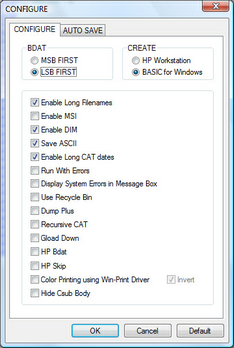
CONFIGURE allows you to customize HTBasic to more nearly match the configuration of an HP 9000 Series 200/300 computer and to alter the way the HTBasic environment works. Using CONFIGURE will allow many existing HP BASIC programs to run without alteration.
You can use theOptions|Run Environment menu from the program window to change the Run Environment. Any changes made to the Run Environment dialog box will appear in all programs when they are opened.
To set the Run Environment, select theOptions|Run Environment menu to display an Run Environment dialog box similar to that shown in Figure 9-1. To change an item, click the desired item on the configuration tab.
To return all settings to the default state, click the "Default" button at the bottom of the dialog box.
The following items can be configured using either the CONFIGURE dialog box, or they can be set programmatically:
Figure 9-1. Configure Dialog Box
The following CONFIGURE statements can only be configured programmatically. These statements should be placed in your AUTOST file so that they are executed each time you use HTBasic: