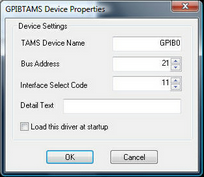
This driver supports TAMS GPIB cards and interfaces. This Windows driver calls the TAMS Software that is shipped with the TAMS GPIB card. Many parameters and configuration options such as default timeouts are controlled in the TAMS software. For details on installation of this software, see your Getting Started Guide for your GPIB card.
To use this driver, the TAMS software must be first installed. With the TAMS configuration software installed and configured, load the driver from inside of HTBasic from Device Setup or with the following statement:
LOAD BIN "GPIBTAMS[;DEVICE Device_name] [ ISC Isc] [ BUS Bus] [ NOTSYS | SYSTEM]"
where Device_name is the name of the device assigned to the GPIB card in the TAMS Configuration Utility
Device Name
If you do not specify a DEVICE name, the default name is used. An example of specifying a different card name is:
LOAD BIN "GPIBTAMS;DEV GPIB7"
ISC Option
The default ISC is 7, but if you are using multiple IEEE-488 boards, you must use the ISC option give each one a unique ISC.
BUS Option
The BUS option specifies the cards BUS address which must be set if it is anything other than the default of 21.
If the card is loaded as NOTSYS, the default BUS address is 20.