GPIB900 |
The GPIB900 driver supports the TransEra Model 900 GPIB card.
Loading
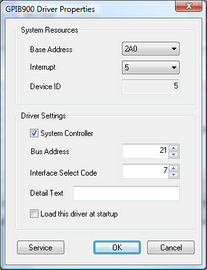
The GPIB900 driver is configured using Device Setup. Once the driver is configured it may be loaded using the Device Setup dialog, or with the following statement syntax in your program or AUTOST file:
LOAD BIN "GPIB900;DEVICE Id [ISC Isc] [BASE Address] [INTERRUPT Interrupt] [BUS Bus] [NOTSYS|SYSTEM]"
NOTE: It may be necessary to reboot the system prior to loading the driver for proper device driver configuration.
Options
One or more options can be specified, each separated by a space. The option may be abbreviated, as long as the abbreviation is unique.
Device ID
Each driver in the Device Setup is uniquely identified by its Device ID. This ID or identification number must be specified when loading the GPIB900 driver from the command line or programmatically.
ISC Option
The default ISC is 7, but if you are using multiple IEEE-488 boards, you must use the ISC option to give each one a unique ISC.
For example, if we have one 900 board at 2A0(hex) interrupt 5, and another at 3A0(hex) using interrupt 6, the following two lines would load drivers for the two boards:
LOAD BIN "GPIB900;DEVICE 5 BASE 2A0 ISC 7"
LOAD BIN "GPIB900;DEVICE 6 BASE 3A0 ISC 8"
The first board would have an ISC of 7 and the second board would have an ISC of 8.
INTERRUPT
The INTERRUPT option tells the driver the interrupt number used by the board. If you do not specify an interrupt, then 5 is assumed.
Bus Option
The BUS option specifies the cards BUS address. This must be set if it is anything other than the default of 21. If the card is loaded as NOTSYS, by default the card’s BUS address is set to 20.
SYSTEM / NOTSYS Option
The NOTSYS option is used if another computer on the bus is system controller. The option stands for "NOT SYStem controller" and causes the board to act as a Talker/Listener Device that can become active controller if control is passed to it.
The SYSTEM option is used to make the board act as system controller. These options are useful for overriding the hardware options on the board. HTBasic assigns a primary address of 21 to the board if it is system controller and 20 if not. The primary address may be changed using Device Setup or with CONTROL register 3 Remember: Only one system controller can be connected to the bus.
Base Option
The BASE option tells the driver the beginning I/O address of your board. You must specify the address in hexadecimal (with no leading "&H").
If the I/O address is changed, it must also be specified in the software. For example:
LOAD BIN "GPIB900;DEVICE 3 BASE 3A0"
This statement corresponds to an I/O address of &H3B8 and the options should be set as follows:
|
Chip Address
|
7
|
6
|
5
|
4
|
3
|
2
|
1
|
Address Range
|
|
3B8
|
on
|
on
|
off
|
off
|
off
|
on
|
off
|
3A0-3BF
|
The default Chip Address for the HM900 board is &H02B8. Addresses in the range &H02A0 to &H02BF are used. The value the LOAD BIN statement is expecting is the lower limit of this address range, 2A0. If any address in the Address Range conflicts with other hardware installed in your computer, the address must be changed. It can be set to any address between &H0018 - &H03F8, in increments of &H20. The board uses 24 I/O addresses below and 8 above the specified address. This range is listed as the Address Range in the following table:
|
Chip Address
|
7
|
6
|
5
|
4
|
3
|
2
|
1
|
Address Range
|
|
018
|
on
|
on
|
on
|
on
|
on
|
on
|
on
|
000-01F
|
|
038
|
on
|
on
|
on
|
on
|
on
|
on
|
off
|
020-03F
|
|
058
|
on
|
on
|
on
|
on
|
on
|
off
|
on
|
040-05F
|
|
078
|
on
|
on
|
on
|
on
|
on
|
off
|
off
|
060-07F
|
|
098
|
on
|
on
|
on
|
on
|
off
|
on
|
on
|
080-09F
|
|
0B8
|
on
|
on
|
on
|
on
|
off
|
on
|
off
|
0A0-0BF
|
|
0D8
|
on
|
on
|
on
|
on
|
off
|
off
|
on
|
0C0-0DF
|
|
0F8
|
on
|
on
|
on
|
on
|
off
|
off
|
off
|
0E0-0FF
|
|
118
|
on
|
on
|
on
|
off
|
on
|
on
|
on
|
100-11F
|
|
138
|
on
|
on
|
on
|
off
|
on
|
on
|
off
|
120-13F
|
|
158
|
on
|
on
|
on
|
off
|
on
|
off
|
on
|
140-15F
|
|
178
|
on
|
on
|
on
|
off
|
on
|
off
|
off
|
160-17F
|
|
198
|
on
|
on
|
on
|
off
|
off
|
on
|
on
|
180-19F
|
|
1B8
|
on
|
on
|
on
|
off
|
off
|
on
|
off
|
1A0-1BF
|
|
1D8
|
on
|
on
|
on
|
off
|
off
|
off
|
on
|
1C0-1DF
|
|
1F8
|
on
|
on
|
on
|
off
|
off
|
off
|
off
|
1E0-1FF
|
|
218
|
on
|
on
|
off
|
on
|
on
|
on
|
on
|
200-21F
|
|
238
|
on
|
on
|
off
|
on
|
on
|
on
|
off
|
220-23F
|
|
258
|
on
|
on
|
off
|
on
|
on
|
off
|
on
|
240-25F
|
|
278
|
on
|
on
|
off
|
on
|
on
|
off
|
off
|
260-27F
|
|
298
|
on
|
on
|
off
|
on
|
off
|
on
|
on
|
280-29F
|
|
2B8
|
on
|
on
|
off
|
on
|
off
|
on
|
off
|
2A0-2BF
|
|
2D8
|
on
|
on
|
off
|
on
|
off
|
off
|
on
|
2C0-2DF
|
|
2F8
|
on
|
on
|
off
|
on
|
off
|
off
|
off
|
2E0-2FF
|
|
318
|
on
|
on
|
off
|
off
|
on
|
on
|
on
|
300-31F
|
|
338
|
on
|
on
|
off
|
off
|
on
|
on
|
off
|
320-33F
|
|
358
|
on
|
on
|
off
|
off
|
on
|
off
|
on
|
340-35F
|
|
378
|
on
|
on
|
off
|
off
|
on
|
off
|
off
|
360-37F
|
|
398
|
on
|
on
|
off
|
off
|
off
|
on
|
on
|
380-39F
|
|
3B8
|
on
|
on
|
off
|
off
|
off
|
on
|
off
|
3A0-3BF
|
|
3D8
|
on
|
on
|
off
|
off
|
off
|
off
|
on
|
3C0-3DF
|
|
3F8
|
on
|
on
|
off
|
off
|
off
|
off
|
off
|
3E0-3FF
|