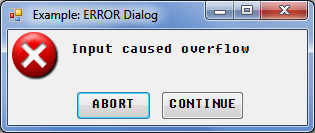
Error Dialog - Displays an error message and suspends program execution
|
Example Program
See
ERROR Dialog for an example program that produces a display similar to that shown above.
See the following program for another example using the ERROR dialog.
Attributes
|
Attribute
|
Type
|
Allowed Values
|
Default
|
|
|
Numeric
|
Any valid BASIC pen number (0-255)
|
System dependent [2]
|
|
|
Numeric
|
Any valid index into the DIALOG BUTTONS array
|
0
|
|
|
String array
|
Any valid string array
|
A single-element array containing OK.
|
|
|
String
|
Font [1]
|
|
|
|
Numeric
|
Any integer number (of pixels)
|
Autosizing
|
|
|
String
|
"LEFT", "CENTER"
|
"CENTER"
|
|
|
Numeric
|
0,1
|
1(maximizable, button appears in title bar)
|
|
|
Numeric
|
0,1
|
0(not minimizable, button
does not appear in title bar)
|
|
|
Numeric
|
0,1
|
1
|
|
|
Numeric
|
Any valid BASIC pen number (0-255)
|
System dependent [2]
|
|
|
Numeric
|
0,1
|
1(resizable, special
border appears around
the dialog)
|
|
|
Numeric
|
0,1
|
0(do not save the
screen)
|
|
|
String
|
Any valid string
|
ERROR
|
|
|
String
|
Any valid string
|
None
|
|
|
String
|
Any valid string
|
Current version
|
|
|
Numeric
|
Any integer number (of pixels)
|
Autosizing
|
|
|
Numeric
|
Any integer, number of pixels from 0,0 [3]
|
Autoplacement
|
|
|
Numeric
|
Any integer, number of pixels from 0,0 [3]
|
Autoplacement
|
[2] Read the
CONFIG file or query for the default with a
STATUS command
[3] Screen or parent
work area upper-left corner