Keypad Dialog- Numeric Keypad Entry |
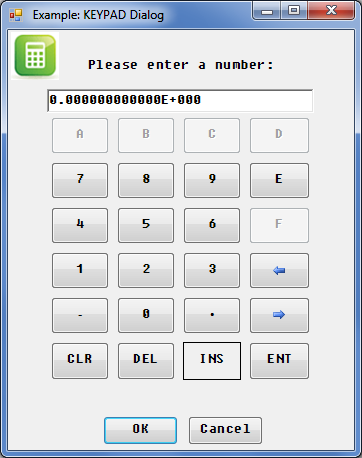
KEYPAD Dialog for an example program that produces a display similiar to that shown above.
See the following program for another example using the KEYPAD dialog.
Attributes
Keypad Dialog Attributes |
|
Attribute
|
Type
|
Allowed Values
|
Default
|
|
Numeric
|
Any valid BASIC pen number (0-255)
|
System dependent [2]
| |
|
BORDER [2]
|
Numeric
|
0,1
|
1
|
|
Numeric
|
0,1
|
1
| |
|
Numeric
|
Any non-negative number
|
20
| |
|
Numeric
|
Any valid index into the DIALOG BUTTONS array
|
0
| |
|
String array
|
Any valid string array
|
A two-element array that contains "OK" and "Cancel"
| |
|
Numeric
|
0,1
|
1
| |
|
String
|
Font [1]
|
System dependent [2]
| |
|
String
|
"REAL", "SHORT INTEGER", "LONG INTEGER", "INTEGER", "BINARY", "OCTAL", "HEX"
|
"REAL"
| |
|
Numeric
|
0 to 328
|
0
| |
|
Numeric
|
Any integer number (of pixels)
|
Autosizing
| |
|
Numeric
|
Any non-negative number
|
0
| |
|
String
|
"LEFT", "CENTER"
|
"CENTER"
| |
|
Numeric
|
Any valid BASIC pen number
|
System dependent [2]
| |
|
Numeric
|
Any valid pen number
|
System dependent [2]
| |
|
Numeric
|
0,1
|
1(maximizable, button appears in title bar)
| |
|
Numeric
|
Between or equal to FORMAT's MINIMUM and MAXIMUM
|
MAXREAL
| |
|
Numeric
|
0 to 328
|
328
| |
|
Numeric
|
0,1
|
0(not minimizable, button
does not appear in title bar)
| |
|
Numeric
|
Between or equal to FORMAT's
MINIMUM and MAXIMUM
|
MINREAL
| |
|
Numeric
|
0,1
|
0
| |
|
Numeric
|
0,1
|
1
| |
|
Numeric
|
0 to 255
|
System dependent [2]
| |
|
String
|
"FIXED", "SCIENTIFIC", "ENGINEERING"
|
"SCIENTIFIC"
| |
|
Numeric
|
0 to 16
|
12
| |
|
Numeric
|
0,1
|
1(resizable, special border appears around the dialog)
| |
|
Numeric
|
0,1
|
0(do not restore the
screen)
| |
|
Numeric
|
0,1
|
1
| |
|
Numeric
|
Any valid integer
|
Return only
| |
|
String
|
Any valid string
|
KEYPAD
| |
|
String
|
Any valid string
|
None
| |
|
Numeric or string
|
Values allowed by "FORMAT", "MINIMUM",and "MAXIMUM"
|
0
| |
|
String
|
Any valid string
|
Current version
| |
|
Numeric
|
0,1
|
1
| |
|
Numeric
|
Any integer number (of pixels)
|
Autosizing
| |
|
Numeric
|
Any integer, number of pixels from 0,0 [3]
|
Autoplacement
| |
|
Numeric
|
Any integer, number of pixels from 0,0 [3]
|
Autoplacement
|
[1] For an explanation of Font and the default value, see Specifying FONT Attribute Values
[3] Screen or parent work area upper-left corner